


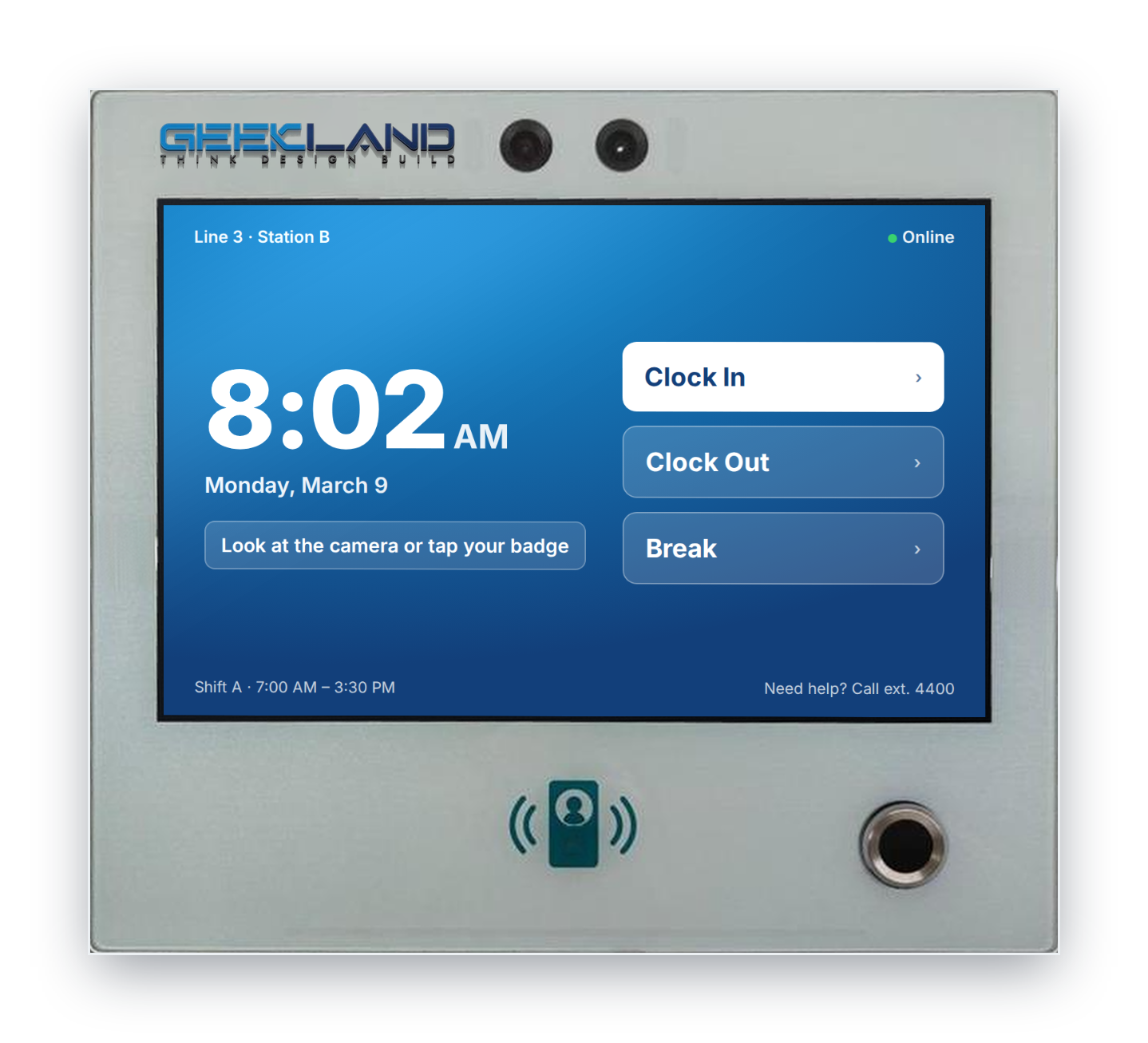
The GKIND10IP65TF is a sealed, PoE-powered 10.4-inch industrial terminal that runs standard Ubuntu or Windows 11 on Intel x86. It gives in-house time clock teams and OEMs a finished, factory-ready hardware base, so they ship their own software instead of bending it around a closed clock.
Why it fits in-house and OEM programs
Most commercial time clocks lock you into the vendor’s firmware, cloud and card format. This unit takes the opposite approach: it is a general-purpose PC in a sealed industrial shell, sold explicitly to developers and OEMs.
- Your software, unmodified. Ubuntu or Windows 11 on an Intel J6412 means existing Linux daemons, .NET or Electron apps, browser kiosks and agents run without porting to a proprietary RTOS or ARM image.
- One SKU, many roles. The same terminal can clock labor, gate a door through its relay, run a resident or visitor lookup, or host shop-floor forms, so one hardware qualification serves several product lines.
- Hardware you don’t have to engineer. IP65 sealing, PoE, badge readers, camera, speakers and a tamper-resistant mount are already integrated, which removes an enclosure and certification project from your roadmap.
- Fleet-friendly by design. PXE network boot and single-cable PoE suit centrally imaged, IT-managed deployments across many sites.
Platform at a glance
Figures below are as listed on the product page.
|
Area |
Specification |
|---|---|
|
Display |
10.4″ IPS, 1280×800, 10-point capacitive touch; 500 nits (1,000-nit sunlight-readable option) |
|
Compute |
Intel J6412, 8 GB RAM, 128 GB eMMC + microSD up to 256 GB |
|
Operating system |
Ubuntu Linux with PXE network boot, or Windows 11 |
|
Identity |
2 MP camera with night vision (5 MP option), 13.56 MHz NFC, optional 125 kHz RFID (RFIDEAS WAVE ID Embedded), optional fingerprint |
|
Network & I/O |
1× RJ45 with PoE 802.3at, 2× USB, audio out, integrated relay; optional Wi-Fi, Bluetooth, LTE |
|
Feedback |
Programmable red/yellow/green LED status bar, 2× 2 W front speakers, microphone |
|
Power |
PoE 802.3at or 12 V DC; no internal battery |
|
Enclosure |
Aluminum frame, IP65, 305×210×45.5 mm, 4.5 kg; black, white or silver |
|
Mounting |
Locking wall mount; VESA 75×75 |
|
Environment |
0–45 °C operating, −20–85 °C storage, 20–90% RH non-condensing |
|
Price |
$1,650 list (was $1,960) |
Built for the plant floor
The enclosure is designed for the places consumer tablets and office clocks fail: washdown zones, dusty production lines, loading docks and covered outdoor entrances.
- IP65 sealing protects against dust and water jets, including the speaker.
- One cable per clock. PoE 802.3at carries power and data, so installs need no local outlet, and a PoE switch on UPS keeps clocks alive through power blips.
- Tamper resistance comes from an aluminum frame and a locking wall bracket; VESA 75 supports pedestals and kiosk stands.
- Glove- and shift-friendly UX is supported by a 10.4″ touchscreen, a traffic-light LED bar visible across the floor, and spoken prompts through the front speakers.
Plan around the 0–45 °C operating range. Unheated outdoor or cold-storage sites need a heated enclosure or an interior mounting point.
Identity stack: meet the badge you already have
Enterprises rarely get to choose their credential; they inherit it. This terminal supports multiple factors, so the clock can match the existing badge program rather than forcing a reissue.
|
Method |
What it covers |
Why it matters |
|---|---|---|
|
Facial recognition (2 MP, 5 MP option, night vision) |
Touchless clock-in, photo capture per punch |
Cuts buddy punching; works with gloves and PPE |
|
NFC 13.56 MHz (built in) |
MIFARE-class badges, phones and wearables |
Fits most modern corporate badge programs |
|
RFID 125 kHz via RFIDEAS WAVE ID Embedded (option) |
Legacy proximity cards |
Reuses the badges already on lanyards |
|
Fingerprint (option) |
Biometric second factor |
Adds assurance for payroll-sensitive sites |
Pair any two for multi-factor punches. Biometric data collection is regulated in several jurisdictions (for example Illinois BIPA), so in-house teams should design consent, retention and template storage into the application from day one.
Development paths
Pick the OS that matches your existing stack. The vendor supplies an SDK for native apps and also supports web-based time clock applications.
|
Path |
Best for |
Notes |
|---|---|---|
|
Ubuntu + PXE |
Teams with a Linux agent, containerized stack, or centrally imaged fleets |
Network boot enables zero-touch provisioning and fast re-imaging |
|
Windows 11 |
Teams with .NET/WPF clients or Intune/SCCM management |
Existing Windows endpoint policies and tooling apply unchanged |
|
Browser kiosk (either OS) |
SaaS time and attendance products |
Ship one web app across clocks, desktops and mobile; update without touching devices |
|
Native via vendor SDK |
Tight integration with readers, camera, LED bar and relay |
Confirm SDK languages and licensing up front |
Integration hooks worth building on:
- The relay can trigger doors, turnstiles or gates on a valid punch, extending a time clock into access control.
- The LED bar gives instant accept/deny or “late” status that workers can read from a distance.
- USB ports accept barcode scanners, printers or extra readers for job-costing and work-order punches.
- Offline buffering is the app’s job: with 128 GB local storage, punches can queue during network outages and sync to payroll or ERP when the link returns.
OEM and fleet rollout
For OEMs, the terminal is a way to launch a branded hardware line without an enclosure program. For in-house teams, it standardizes every site on one managed endpoint.
Configure per program: colorway (black, white, silver), 500- or 1,000-nit display, 2 MP or 5 MP camera, fingerprint on or off, 125 kHz RFID on or off, and Wi-Fi, Bluetooth or LTE backhaul where PoE cabling is impractical.
Confirm with the vendor before committing (the product page is silent or inconsistent on these):
- Branding: custom boot logo, bezel printing, packaging and minimum order quantity
- Certifications: FCC, CE, UL/IEC 62368, and any biometric or RF approvals needed per region
- Warranty term, RMA process and advance-replacement options
- Product lifecycle: guaranteed availability window and change-notification policy for CPU, board and readers
- SDK: supported languages, reader/relay/LED APIs, sample apps and licensing
- Ethernet speed: listed as 100 Mbps; confirm whether gigabit is available
- Display: 1280×800 is listed alongside a “4:3” aspect ratio; confirm the actual panel
- Memory: listed as DDR3 on a J6412 platform; confirm type and whether 16 GB is offered
- App store: the page mentions Play Store app compatibility, which doesn’t apply to Ubuntu or Windows builds; clarify
Recommended next step: order two or three evaluation units, run a four-week pilot on one line or site, and measure punch speed, read rates with your badges, and uptime through PoE and network events.
Sources
- GKIND10IP65TF product page, Geekland (accessed Sep 24, 2026). Vendor contact: support@kju.760.mytemp.website, (877) 597-7673.